Start with one location. Nothing in your clinic software changes.
The clinic's standard · set oncePlan designNova, lockedPrice list150 servicesChart rulesthe same for allRoles4
Dr. Kovac
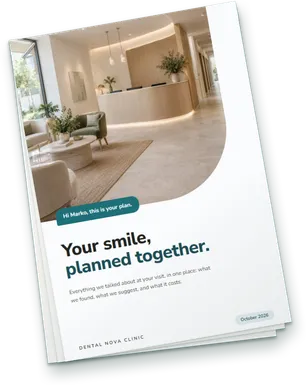
Your new smile
starts here.
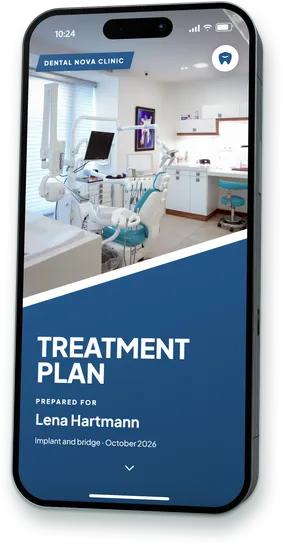
A treatment plan for Lena Hartmann
Dental Nova Clinic
October 2026
10:24
ViewedAccepted
Dr. Patel
Your new smile
starts here.
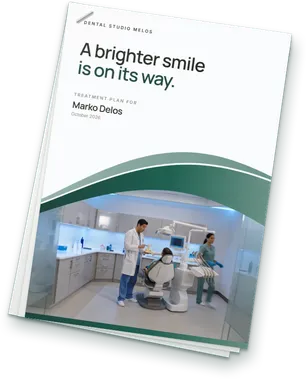
A treatment plan for Marko Delos
Dental Nova Clinic
October 2026
10:24
Viewed
Dr. Marin
Your new smile
starts here.
A treatment plan for Ana Horvat
Dental Nova Clinic
October 2026
10:24
Sent
Operations · seesA sketch, not the product's screenAwaiting decision€86,400€81,420Accepted this week1112
Growth that needs no new patients and replaces no software.
Your dentists recommend the treatment. What is missing is a plan the patient can read, question and accept, on top of the software you run.
More plans accepted.
Every recommendation leaves as a document the patient can open at home, ask about and accept on the page. It no longer rests on what they remember from the chair.
SentViewedAccepted
Complex work gets a fair hearing.
Implants, bridges and full-arch cases carry a clinic's best margins and need the most explaining. The plan sets phases, options and prices side by side, where a spoken summary cannot.
Plandentic sits above the clinic software each location already runs. Patients and price lists come in from a file, so there is no migration and no long onboarding.
Location 1Clinic software ASchedule · billing · records
Location 2Clinic software BSchedule · billing · records
Location 3Clinic software CSchedule · billing · records
Data comes in by import.
Patient lists, price lists and quotes made in other programs, in any language. A person confirms before anything is saved.
Optional sync.
Connect the two when you want, and an accepted plan can signal your clinic software to create the item there.
Five dentists. One finding. Five different plans.
What a patient takes home depends on which room they sat in. Multiply that by every dentist you have.
The same finding in every room
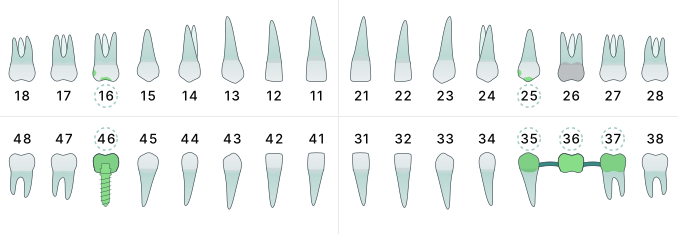
Tooth 46 is missing. The recommendation is an implant and a crown.
Dr. Kovac
Explains it in the chair.
Leaves with: what they remember.
Dr. Patel
Prints the procedure list from the clinic software.
Leaves with: a page of codes and prices.
Dr. Marin
Writes the total on a card.
Leaves with: one number.
Dr. Weber
Emails his own document the next day.
Leaves with: two pages in his layout.
Dr. Rossi
Shows photos on the screen and sends nothing.
Leaves with: nothing to reread.
What the clinic can say about these five plans a week later
?which were understood
?which were followed up
?which are still open
The blind spot
You standardised scheduling, billing and intake. The plan the patient takes home is still each dentist's own.
How case acceptance is counted today
In most clinic software a plan is accepted when someone marks it scheduled or completed. What the patient received, opened or asked is recorded nowhere.
Industry benchmark
0255075100%
Case acceptanceGroups with eight or more locations
A vendor's figure from clinic-software data, counted as plans marked scheduled or completed. It is not a Plandentic figure.
Every dentist, a different document.
One patient receives a designed proposal, the next a printout. Same clinic, different impression.
Acceptance is a tick in the clinic software.
It says a plan was scheduled. It cannot say whether the patient opened it, what they asked, or why they went quiet.
Follow-up depends on who is at the desk.
Some patients hear back in minutes, some in days. Nobody can see which, so nobody can fix it.
Several clinic systems across your locations? The plan is the one layer you can make the same everywhere without replacing any of them.
Set the standard once. Every plan wears it.
An administrator decides how a plan looks, what it costs and what it explains. The diagnosis and the treatment stay with the dentist.
Sample planA sketch, not the product's screen
Dental Nova ClinicTreatment plan · Lena Hartmann
Phase 1 · Extraction, tooth 46
€180
Phase 2 · Implant, tooth 46
€1,450
Total
€4,980
About your treatmentDental implants
Deutsch · CHF, at the rate of the day it was sent
Plan designUp to ten designs, one the default. An administrator can lock a design.
Chart rulesThe chart refuses what is anatomically impossible, for every dentist alike.
Price list150 services in 12 groups, priced once by the clinic.
Explanations63 plain-language topics, edited once, added where a plan needs them.
Language and currency17 document languages, chosen per plan. The exchange rate is fixed on the day you send.
The standard covers how a plan is presented. What goes into it is the dentist's decision.
Everyone sees what their work needs, and nothing else.
Roles decide who may open patient records, change prices, redesign documents or read the numbers. The server checks every request.
A sketch, not the product's screenCustom roles are part of Pro
Front desk
Dentist
Coordinator
Clinic manager
Clinical work
Patient records
View
Edit
Edit
View
Delete patients
None
None
None
None
Practice administration
Staff
None
None
None
Manage
Clinic settings
None
None
None
View
Billing
None
None
None
None
Content & documents
Pricebook
View
View
View
Edit
Content
None
Edit
View
Edit
Document design
None
View
Edit
Edit
Data & analytics
Export
Patients
None
Patients
Everything
Import
No
No
No
Yes
View analytics
No
Yes
Yes
Yes
View team analytics
No
No
No
Yes
The Administrator role always has every permission.
Front deskOpens a patient's record and the price list. Cannot change a plan, a price or a design.
DentistBuilds diagnoses and plans and edits the explanations. Does not see billing or the team's numbers.
CoordinatorSends plans, answers questions and adjusts the document. Cannot change a price.
Clinic managerReads every number, manages staff and the price list. Views records without editing them.
Checked on the server.
A hidden button and a hand-made request get the same refusal.
Questions go to the patient's care team.
Not to everyone. If nobody answers within the window you set, four hours by default, the question is raised to the whole clinic.
Care-team routing is part of Pro
Two people, one case.
You see who else has it open, and a conflict check stops one person overwriting another.
Which plans were accepted, whose they were, and what is still waiting.
Every plan carries who diagnosed it, who built it, who sent it and what the patient decided. The team view adds it up.
Team performance · last 90 daysA sketch, not the product's screenIllustration, not dataAnalytics is part of Pro
Acceptance
67%
60 accepted of 90 sent
Awaiting decision
€86,400
23 plans with patients right now
Avg. accepted plan value
€3,171
Median time to decision
4 days
Team member
Planned
Sent
Accepted
Acceptance
Value of their plans
Dr. KovacDoctor
38
36
28
78%
€68,400
Dr. PatelDoctor
31
30
20
67%
€82,600
Acceptance by case complexity
Simple82%
Moderate72%
Complex58%
Very complex47%
Median time to decision for plans they sent: 6 days
Dr. MarinDoctor
27
24
12
50%
€39,260
MariaTreatment Coordinator
52
36
69%
InesTreatment Coordinator
38
24
63%
What happened to each plan.
The numbers count plans and decisions: who built a plan, who sent it and what the patient decided. The treatment stays the dentist's call.
Its own permission.
Reading the team's numbers is a separate permission, and the figures stay put when you change your prices.
At this size, small things multiply.
Four things that are trivial with three people and expensive with thirty.
Monday morningA sketch, not the product's screenIllustration, not data
Needs you
Lena HartmannAwaiting your reply · asked about phase 2Reply
Marko DelosViewed, no response · 3 daysSend reminder
Ana HorvatSent, not yet viewed · 5 daysSend reminder
This week
14Questions answered
22Plans sent
19Patients viewed
12Accepted
What is waiting, in one list.
Each morning the list says which patients are waiting on the clinic, and which the clinic is waiting on.
The patient from abroad
Deutsch
Italiano
English
Hrvatski
Slovenščina
Français
Español
Nederlands
Polski
Magyar
Română
Türkçe
Svenska
Norsk
Dansk
Português
Українська
Sent in the patient's language.
Seventeen document languages, chosen per plan. Prices can show in the patient's currency, at the rate of the day you send.
The changed plan
rev 1rev 2
What changed
Money
Crown, tooth 36: €620 to €580
Plan & clinical
Option B added
A changed plan says what changed.
Every send is a numbered revision. The patient keeps one link, and the clinic sees what changed between versions.
The practice that joins
patients.xlsx
cjenik.csv
Preisliste.xlsx
Confirmed by a person
A new location brings its own files.
Patient lists and price lists come in from spreadsheets in any language. The columns are matched for you, and a person confirms before anything is saved.
What about more than one location?
Each location runs as its own clinic in Plandentic, with its own address, price list, currency, language and team. The product is the same in each. A group view above them is not built.
Illustration, not data
Group viewNot built
Dental Nova Zagreb
Hrvatski · EUR
18 people
Own price list and plan designs
Dental Nova Split
Hrvatski · EUR
11 people
Own price list and plan designs
Dental Nova Ljubljana
Slovenščina · EUR
9 people
Own price list and plan designs
In every location today
The same chart, rules and service catalogue
Its own plan designs, price list, currency and language
Its own roles, routing and numbers
Its own address and team on every plan
A full export of its data, whenever you ask
Not built
One sign-in across locations
Plan designs and price lists shared between locations
Numbers rolled up across locations
Single sign-on and a public API
If your group needs one of these to start, tell us which. We would rather hear it now than promise it. Write to the founders
Rolled out the way your group works.
Flip each switch: both sides are a finished way to work.
You start with
Pilot at one clinic. Its numbers are the case for the next.
Set up every clinic on the same day, each as its own account with its own price list and team.
Plan designs are
An administrator locks the designs, and every plan leaves in the clinic's look.
Dentists choose among up to ten designs, for implants, aesthetics or children.
Patient questions go to
Every staff member hears every patient question. Simple, for a smaller site.
Only the people who worked on that patient hear it, and it is raised to everyone if nobody answers. Part of Pro.
The team's numbers are read by
Reading the team's numbers is a permission of its own. Give it to managers only.
Or open them to the whole team, so the numbers are nobody's secret.
Each location's clinic software stays where it is.
Stays as it is
Each location's clinic software
Schedules, billing and clinical records
Each location's price list, imported once
Your patients, imported or added as you go
Changes
Every plan leaves in one standard
Every plan has a status
Questions arrive on the part of the plan they are about
Every decision is on record, with who did what
Start with one clinic. Add the next when the first has numbers.
No migration and no rollout project. Set the standard, give everyone a role, send the first plan.
1
Set the standard
Brand, plan designs and the price list, which comes in from a file.
2
Give everyone a role
Invite the team. Nobody sees more than their work needs.
3
Send, then read
Plans go out from the first day, and the numbers fill in as patients answer.
Works alongside your clinic software
No migration and no IT project
Your data can be exported in full at any time
Treatment plan software for dental groups: short answers.
What it is
Is Plandentic DSO dental software?
It is treatment plan software for dental groups and DSOs, not practice management software. It covers the plan: charting it, pricing it, sending it and seeing what the patient decides. Scheduling, billing and clinical records stay in your clinic software.
Does it replace our practice management system?
No. Plandentic works alongside your clinic software and replaces none of it, so locations on different systems can all use it.
How do you standardise treatment plans across dentists?
An administrator sets the plan designs, the price list and the explanations once. Every dentist builds on the same chart with the same rules, so every plan leaves in the same standard. The diagnosis and the treatment remain the dentist's.
Locations and access
Can we run several locations?
Yes, each as its own clinic in Plandentic, with its own address, price list, currency, language and team. A shared sign-in and numbers rolled up across locations are not built.
Who can see what?
Access follows the role, in eight areas from patient records to billing, and the server checks it on every request. Pro adds roles you define yourself.
Do you support single sign-on?
Not yet. Single sign-on and a public API are not built.
Numbers and cost
How is case acceptance measured?
As accepted plans out of sent plans. A plan counts as accepted when the patient accepts it on their own page, or when a team member records the decision.
What is a good case acceptance rate for a dental group?
Henry Schein One's 2026 Catalyst Index puts the average for groups with eight or more locations at 45 percent, and the top tenth at 75 percent. It is an industry benchmark from clinic-software data, not a Plandentic figure.
What does it cost for a large team?
Plandentic is in beta and not on sale yet. When it opens, Pro is priced by team size and never by the number of plans, and for 41 or more users we put the plan together with you.